v1.3.0 Maintainer Notes: Declared Extension Settings and Item Views
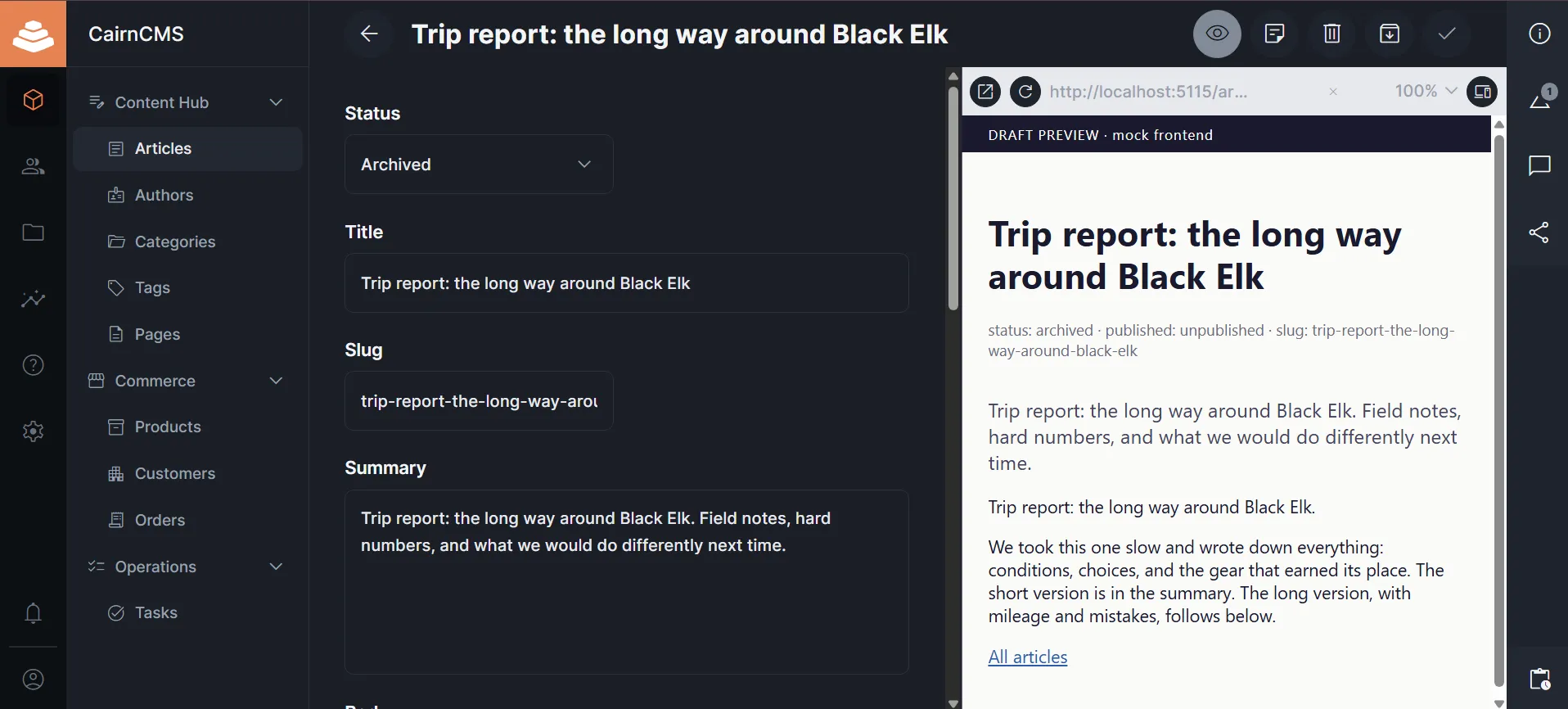
CairnCMS v1.3.0 introduces a number of fixes and features, including two additions to the extension system. An extension can now declare its own settings in its manifest, and CairnCMS validates, stores, and presents them. A new app extension type, item-view, allows an extension to render a component in a split pane beside the item form.
Note that neither addition is specific to any workflow. They are placement and configuration primitives, intended for any extension that needs operator-managed configuration or a component placed next to the record an editor is working on.
Live preview is the first extension built on both, and it is available separately as the first official CairnCMS extension.
Readers wanting to use extension settings should begin with the extension documentation.
Readers wanting to install the live preview extension should visit the CairnCMS extensions repo.
Motivation
CairnCMS aims to keep workflow-specific features out of core when a general extension surface can support them. However, without settings, an extension has nowhere standard to store operator configuration. Without per-collection configuration, a collection-specific extension has to either add columns to core system tables or invent its own storage. And without an item-editor placement surface, an editor-adjacent extension has nowhere to render.
Live preview elucidated the need for these surfaces. Live preview renders a frontend beside the item being edited. Upstream, it is implemented in core, with a preview_url column on the collections table, a split region in the private view, and preview-specific wiring in the item route. The feature is useful, but it is also tied to a publishing workflow, and the need for editorial preview is not a universal assumption for a data and content platform. The same core should serve publishing teams, internal tools, customer management systems, analytics dashboards, back-office workflows, and projects that never render a public website.
We believe that the better core change is to add the general surfaces an extension needs in order to deliver the same feature from an extension. Three in particular were needed:
- somewhere to store operator configuration
- a way to configure a value per collection, where operators already manage collections
- a way to render a component beside the item form
None of these is specific to live preview, which is what justifies adding them to core.
Declared extension settings
An extension declares its settings in the manifest. CairnCMS owns everything after the declaration. It validates writes against the declared shape, stores inline values, encrypts inline secrets, resolves config-sourced secrets from deployment configuration, renders an editor for operators, and serves the values back to the extension at runtime.
Stored settings live in a core-owned internal table. Internal tables are excluded from the collections, fields, relations, schema, items, import, export, GraphQL, and OpenAPI surfaces, and a confined extension cannot reach them through host.items.
Secret settings have two supply paths. Inline secrets are entered through the management UI, encrypted at rest with SECRETS_ENCRYPTION_KEY, masked on external reads, and delivered according to the extension runtime. The key is separate from the platform auth SECRET, so rotating auth tokens does not orphan encrypted extension data.
Config-sourced secrets are supplied by deployment configuration and are never stored by CairnCMS. For confined (sandboxed) extensions, secret values resolve as opaque references so the sandbox never sees the raw material. Full-authority extensions receive raw server-side values because they already run as trusted server code. In both cases, the encryption boundary protects stored values from database exposure; it is not a containment boundary against full-authority code.
Two rules govern the store. Settings never gate runtime, and stored values survive by default. That is, removing an extension, or dropping a key from its declaration, leaves the rows in place and inert. Deleting a collection removes that collection’s scoped rows.
Per-collection configuration
Collection-scoped settings are edited in the data model editor, on the collection they apply to.
The value itself does not go on the collection. An extension declares a collection-scoped setting, CairnCMS renders an editor for it inside the collection editor, and the value persists in the settings store under the extension, the key, and the collection name.
A declaration may also request an editing interface for the field. The value comes from a closed allowlist, which currently holds one interface, the field-aware template input, and it is valid only on a non-secret, collection-scoped string. Contextual options such as the collection being edited are supplied by CairnCMS, and a manifest cannot override them. The allowlist will widen as further interfaces are reviewed for this use.
The item-view extension type
item-view is a new app extension type. It registers through the same machinery as every other app extension type, the SDK scaffolds it, and it can be included in a bundle.
A contribution declares its placements in extension code. There is one placement in this release, a split pane beside the item form. CairnCMS renders the toggle from the contribution’s name and icon. The extension does not declare its own trigger.
The pane receives a small read context, including the collection, the primary key, collection metadata, whether the item is new, a readonly snapshot of the saved item, a signal that fires after a successful save, and a settings reader already bound to the extension and the current collection.
Importantly, it does not receive the item editor’s internal state. Exposing internal composables would promote them to public API, and every later change to the editor would then break the extensions that used them. Unsaved edits, change signals, standalone header actions, sidebar placements, and write verbs are all reasonable additions, but each is a contract of its own and will be added as time allows or when there is demonstrated need for it.
The live preview extension
Live preview declares a collection-scoped preview URL, contributes an item-view split pane, and refreshes an iframe after a successful save. Operators set the URL per collection in the data model editor. A collection with no configured preview URL does not show the toggle.
The URL is operator-configured, and it interpolates values from the item. The result is assigned to an iframe src, so the extension treats it as an injection sink. The scheme and host must be literal, so interpolation occurs only in the path, query, or fragment and a field value cannot move the frame to another origin. Values are encoded per URL component, and the iframe sends no referrer.
Two constraints belong to the operator. The default Content Security Policy per CairnCMS’s threat model blocks external frames, so an operator must explicitly allow the preview origin. A target site that sends X-Frame-Options or a restrictive frame-ancestors policy will refuse to be framed, and CairnCMS cannot change that from the admin app.
What else these surfaces support
With these primitives, the possibilities are endless. The split pane can hold anything that belongs beside a record, such as related items, a computed total, a map that updates after an address is edited, an embedded dashboard, a where-used graph for a part, or an API and permissions diagnostic. Per-collection configuration is equally general.
Limitations and planned work
There is no collection-level or list-level contribution surface yet, so an extension that acts on a whole collection has nowhere to render. As the name indicates, item-view is scoped to the item editor.
Confined host.items remains read-only. Write verbs need their own design, and are planned as a next step.
Acknowledgements
The split-view primitive and the preview iframe component are adapted from the Directus live preview implementation, which converted from BSL to GPL-3.0 on 2026-05-26 under the three-year change date. CairnCMS adds the item-view contribution surface, the settings store and its management surfaces, and the URL renderer and its security constraints around that adopted code.